
Start your toy manufacturing design brief with the authorized references you have, their versions and the question you want reviewed next. Identify what each item defines, then mark missing information, conflicting requirements and decisions that still need an answer.
You can begin with artwork, photos, an existing sculpt, CAD or an authorized physical reference. If you only have a front view, say that the back is undefined. With a 3D file, record the intended size and units, the parts it includes and its known use. Mark anything uncertain so the first review can identify what is needed.
References can have different jobs. A newer model may show the current shape while an older drawing supplies a color direction. Name those roles and identify any differences that need confirmation. Choosing the file with the latest date does not settle every requirement.
Finally, ask what the next review will return and confirm the file exchange and deliverable scope. A file that opens still needs the relevant engineering review. Digital appearance, physical fit and tooling approval each require evidence appropriate to that decision.
State What the Next Review Should Decide
State whether you want to discuss the character’s appearance, identify gaps in an existing model, or define the work needed for a prototype. Give the recipient a question they can respond to. Asking whether a sculpt represents your intended silhouette calls for a different discussion from asking what engineering work is needed before sampling.
Describe the intended finished product and size, with units. Include known requirements that affect this review: movement, accessories, material direction, decoration or packaging. Mark undecided requirements as open. Add quantity, market or timing when they affect the requested scope; avoid presenting an early assumption as a fixed requirement.
For 3D modeling and product engineering, identify which design decisions you have made and which you want to discuss. Ask the receiving team to confirm the proposed review scope and any additional inputs needed before work begins.
Prepare the Inputs You Already Have
Choose the starting point that matches your available references. If you have several types, identify the role of each and note where they disagree.
| Starting Point | Identify and Include | Keep Open | Next Review Request |
|---|---|---|---|
| Artwork or photos | Authorized views, source/revision, intended size and appearance priorities | Unshown views, unclear details and undecided features | Confirm what can be interpreted and what needs further definition |
| Sculpt or mesh | Current file/revision, intended size and units, included parts and known use | Uncertain scale, omitted parts and unreviewed engineering requirements | Confirm readability and the engineering review needed for the proposed next step |
| CAD or authorized physical reference | File or sample identity, revision, reference purpose and any recorded measurements | Differences between sources and dimensions or features still to verify | Agree which source defines each requirement and what further review is needed |
Artwork, Photos and Missing Views
Mark the views you have and the areas they leave undefined. A front drawing can establish the face and clothing while leaving the back unresolved. Ask for that missing design work to be discussed, and identify who will decide it. You can begin the conversation with the available view.
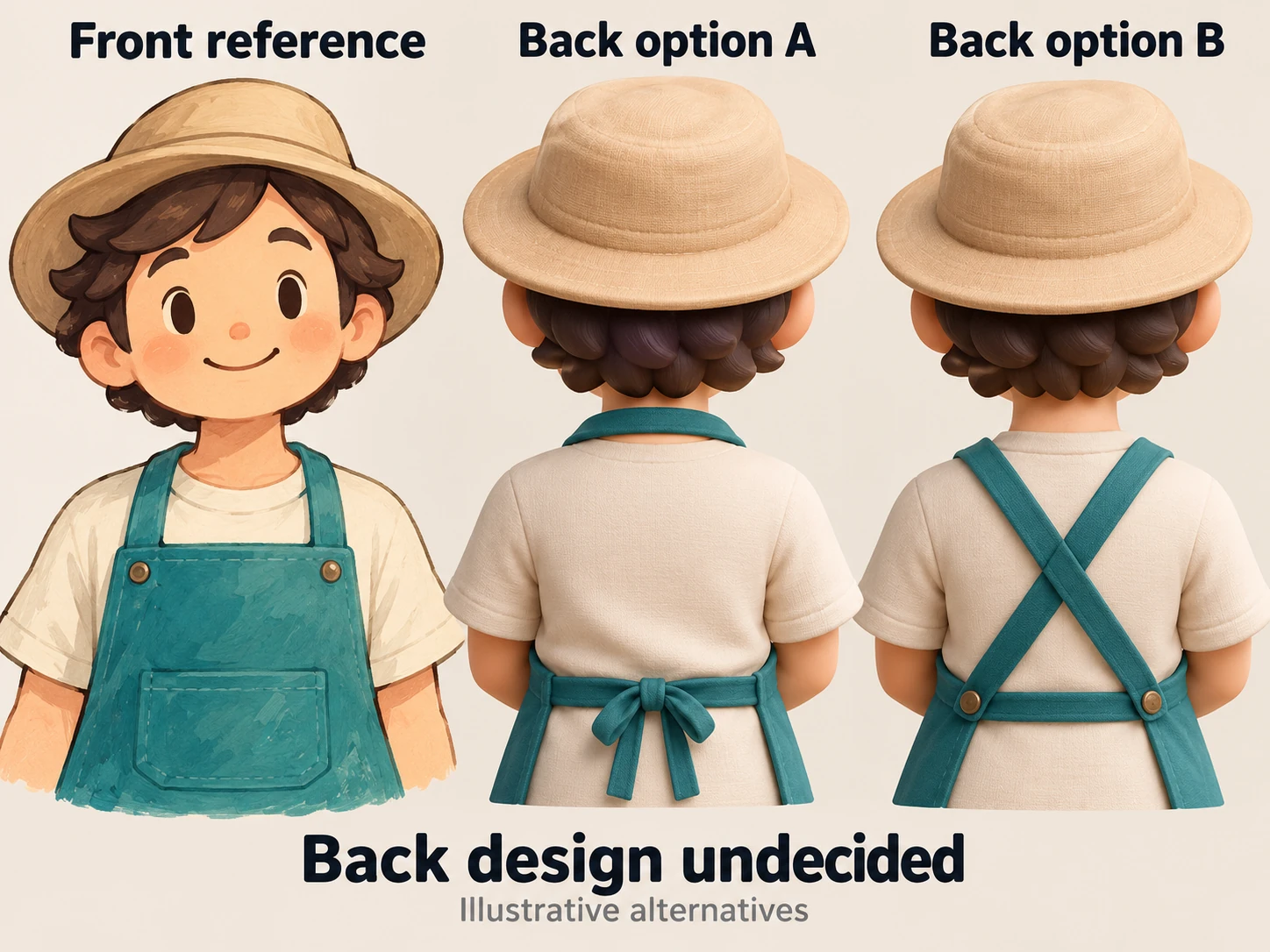
Explain which appearance details must be preserved and where interpretation is welcome. If a photograph supplies a color direction, identify the relevant area and whether a separate color reference remains to be agreed. Avoid leaving the recipient to infer whether every visible detail belongs to the intended product.
Existing Sculpts and Mesh Files
Identify the exact revision being submitted and its known purpose, such as visualization or a previous printing step. State the intended finished size and units even if the filename already contains a size. If you do not know the file’s scale or contents, flag that uncertainty for review.
List the parts included and any accessories supplied separately or still missing. Send existing views or notes that explain your intent, while asking the receiving team to confirm what it can read and assess. Keep software export settings and any required conversion within the agreed technical exchange.
CAD and Authorized Physical References
Say what the CAD or physical reference is intended to define: shape, dimensions, an interface or appearance. Record the sample’s identity and revision if known. Distinguish a measurement you have recorded from a size you would like the new figure to have.
If the CAD and sample differ, identify the affected feature and ask which source should guide the next review. Confirm authorization to use the reference for the proposed work. Discuss how an authorized physical sample will be exchanged before sending it, and keep any uncertain details visible.
Name Each File and Its Intended Use
Give every reference used in the review an identifiable name or item ID and revision. Match the record to the actual attachment, annotated view or sample. If several files have similar names, specify the one being submitted; a note saying “use the current model” leaves that choice unresolved.
Copy and complete one record for each relevant item:
Item / revision: [Exact reference and version]
Purpose / feature: [Intended review use and feature it defines]
Status: [Available, missing, conflicting or awaiting a decision]
Next action: [Specific confirmation, information or review needed]
Responsible contact: [Who will respond to that action]
Use labels that fit your project; these fields do not require a particular filename convention or company form. Keep receipt status separate from unresolved decisions. “Provided; size conflict open” records both facts without implying that the dimension has been approved.
Include earlier versions only when they still define something relevant or are needed to explain a difference. Identify their limited use. When replacing a submitted reference, name the replacement and tell the recipient which earlier use has changed.
Flag Missing Inputs and Conflicting References
Keep Appearance References Separate From Geometry
A color drawing and a sculpt can serve different purposes within the same project. Identify the surfaces or details controlled by the color reference, then confirm which model represents the intended shape. If their outlines differ, mark the difference on an identified view or describe the affected feature precisely.
Record whether a reference communicates a direction for discussion or a requirement already confirmed by the buyer. A color image can still leave the final color reference open. Likewise, identify whether a dimension is a target, a recorded measurement or an unresolved annotation. Give its units and define what the measurement includes.
Assign the Next Decision Without Guessing
Attach the question to the affected references and revisions. State what is known, what conflicts and the response needed. Ask the buyer’s design contact to clarify appearance or product intent; ask the receiving team to assess the engineering implications of that choice.
Some questions need both replies. A buyer can confirm a target size while the receiving team still needs to assess the geometry against it. Keep both actions visible and identify a contact for each.
Send the package with those open items attached. Silence on a conflict leaves the requirement unresolved. When a reply arrives, record the decision and its scope, then confirm whether any reference or planned review needs to change.
Illustrative Buyer Scenario: A Desktop Gardener Character
Imagine an original desktop gardener character with a round hat and a painted apron. The character, reference names and handoff notes are invented. This is not a FigCrafts client project or a completed manufacturing review.
You have a current form reference, an older color drawing and a written height request. The drawing shows a different hat outline from the current form, and its dimension disagrees with the height request. Those differences need separate replies: which colors still apply, which shape should be reviewed and what finished height is intended?
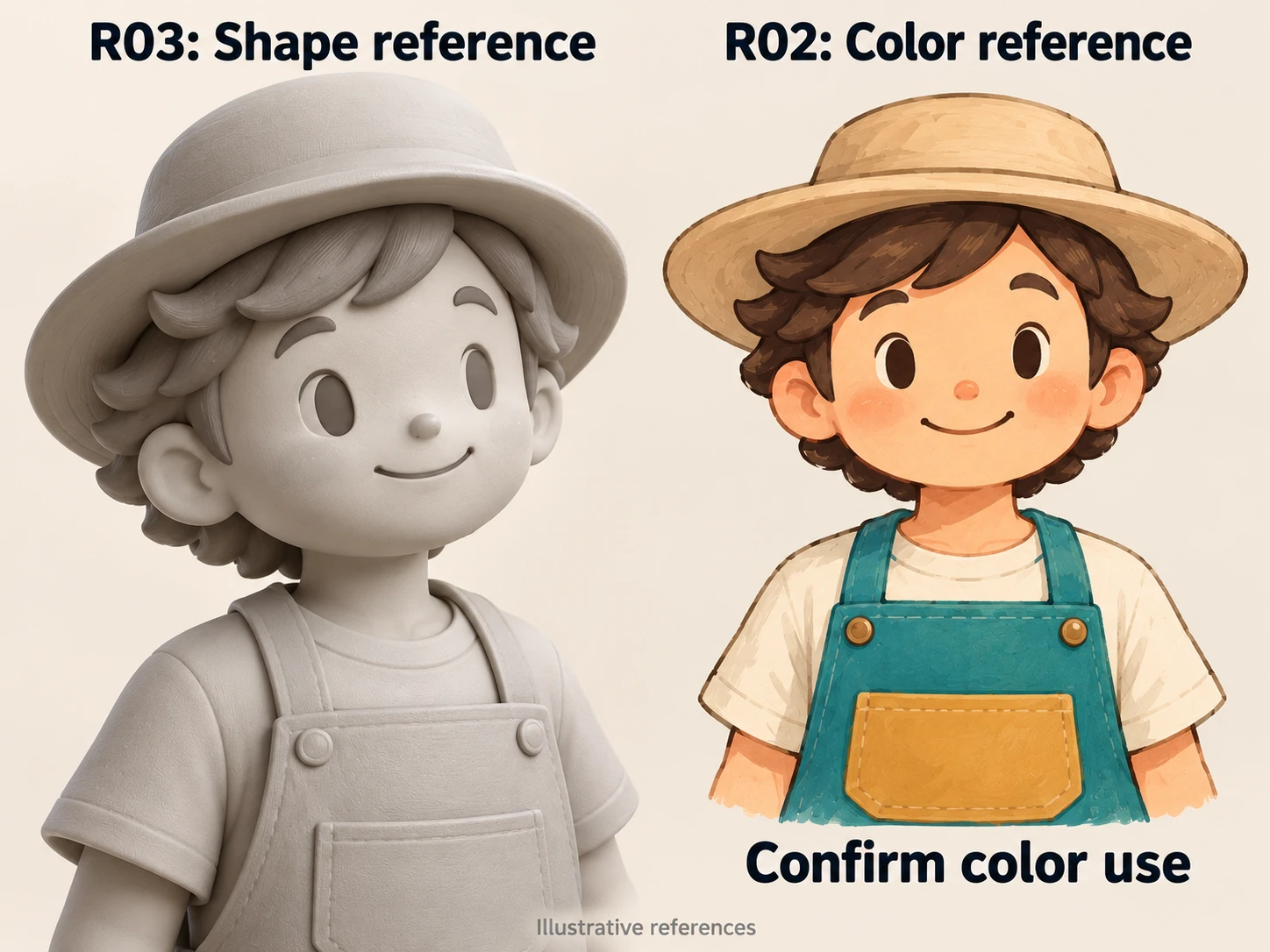
Give each item a defined use and keep the unanswered questions attached to it:
| Item and Revision | What It Defines | Status | Next Action | Who Responds |
|---|---|---|---|---|
| Gardener_Form_R03 | Current shape reference for the silhouette discussion | Provided; engineering review open | Confirm the reference can be read for the intended review | Receiving team |
| Gardener_Color_R02 | Proposed apron colors; its hat outline differs from R03 | Provided; applicable colors and reference use pending | Identify which apron colors still apply and confirm the form reference | Buyer’s design contact |
| Gardener_Brief_R01 | Requested finished height, which conflicts with the dimension on R02 | Provided; size conflict open | Confirm the intended height; assess whether the geometry needs review against it | Buyer confirms the target; receiving team assesses the geometry |
| Initial review request | Intended review purpose and expected response | Scope to confirm | Agree what will be reviewed, what files are needed and what output will be returned | Buyer and receiving team |
Keep R02 with the package if its colors are still relevant. Ask for confirmation of that limited use; avoid leaving the recipient to choose between the two hat outlines. Keep the size discrepancy visible until the target is clarified and its implications have been reviewed.
Send the relevant references with a specific request:
Please review the shape in Gardener_Form_R03. The apron colors and finished height remain open in the notes. Confirm which files you can use and what the next review will return.
Record the reply against these items. A confirmation that the files are readable leaves the design questions open; capture the applicable reference, size decision and agreed next review as they are confirmed.
Confirm the Output and File Exchange
Name the output you need and what you intend to do with it. Ask whether the proposed work includes:
- Appearance review views: images for discussing the visible design, with the views and review purpose agreed.
- Geometry for the next stage: a model prepared for a specified next use, with its revision and remaining review requirements identified.
- Manufacturing handoff information: the agreed files and references needed by the receiving team for its defined task.
- Editable working source files: source data whose format, included content and delivery conditions need explicit confirmation.
If you need commercial presentation renders, ask whether they are included in the proposed scope. Identify any required views or usage purpose before assuming that an engineering review will supply those assets.
Agree on the incoming and outgoing file formats, which revision will be used and who will provide each item. Confirm whether the recipient can open the supplied material and whether further inputs are required. Ask what response or deliverable will be returned, and identify any source-file requirements before agreeing to the work.
Raise confidentiality requirements before exchanging restricted files and agree on the exchange method. Keep confirmation of receipt distinct from conclusions about the design.
Later prototype, tooling and pre-production sample approval requires evidence for the relevant physical decisions. A digital view or file conversion alone does not establish part fit, molding, decoration or finished-product approval. Record the purpose and limits of the output you are receiving.
Questions About Artwork and 3D File Preparation
Can I Start With One Drawing or a Photo?
Yes. Start an initial discussion with your best available authorized reference. Identify the views, dimensions or features still undefined, then agree on the additional design work, engineering review and next output needed.
Does an STL File Mean the Figure Is Ready for Tooling?
No. An STL extension alone does not establish the intended size, complete part relationships, manufacturing suitability or approval scope. Provide the file’s known purpose and ask the receiving team to identify the review and additional inputs required.
Should the Newest File Override Every Other Reference?
Confirm the intended use of each reference. Shape, color and size may be defined in different items. Where they conflict, identify the affected feature and obtain the relevant decision instead of treating the latest date as approval.
Send Your References for an Initial Review
Send FigCrafts your authorized artwork, photos, current 3D/CAD or physical-reference details, with their revisions and intended uses. Include the finished size and units, product type, known production requirements and the questions still open. For custom figure manufacturing services, tell us what you want the next review to decide so we can discuss the engineering scope and proposed output.
Review Your Figure Project Inputs
We work with brand-owned, licensed or otherwise authorized designs. Proof of rights may be requested before production.